What you get: Teach Kanakupuli once; it remembers forever.
About 2 minutes
Why it matters
Your statement says “UPI-BIGBASKET-12345”. You know that's groceries. Tell Kanakupuli once, and every future import puts it in the right place automatically. Each rule saves you a few seconds every month — for years.
How it works
- 1Go to Transactions → Rules (or tick “Remember” while reviewing an import).
- 2Type words that appear in the description, e.g. “bigbasket” or “salary infotech”.
- 3Choose where it goes: a category, or one of your accounts (for SIPs, card bills, transfers).
- 4Press Save rule. The longest matching rule wins when two could apply.
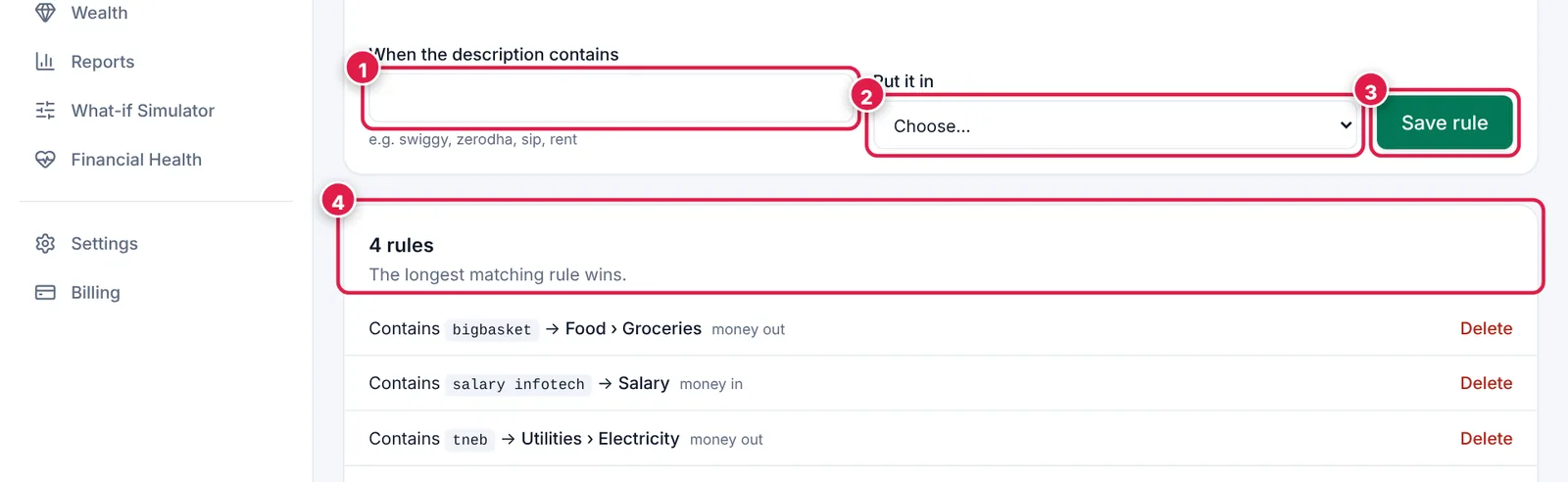
Rules turn repeat work into zero work.
- 1. Words to look for in the description.
- 2. Where to put it.
- 3. Save rule.
- 4. Your rules — delete any you no longer need.
Ready? It takes about 2 minutes.
Start your free trial