What you get: Pay your future first, spend the rest guilt-free.
About 5 minutes
Why it matters
When income arrives with no plan, spending fills the space. Allocation splits your income into purposes before you spend it — so savings happen automatically, not “if something is left”.
Default buckets: FF – Financial Freedom 10% (investments you never touch), LSS – Long-term Savings for Spending 10% (big purchases, emergencies), Education 10%, Necessities 55%, Play 10% (guilt-free fun) and Give 5%.
Each expense category feeds a bucket automatically, and transfers to your Savings/Investments accounts fill FF and LSS. You see at a glance which bucket is on track and which is over.
How it works
- 1Open Allocation. The top bar shows this month's income split into buckets.
- 2Each card shows the planned amount, what's used or saved, and what's left. A red warning means over budget.
- 3Press Customise to change percentages, rename buckets or link categories and accounts.
- 4If your income varies, use “Use a different amount” to plan on a fixed figure.
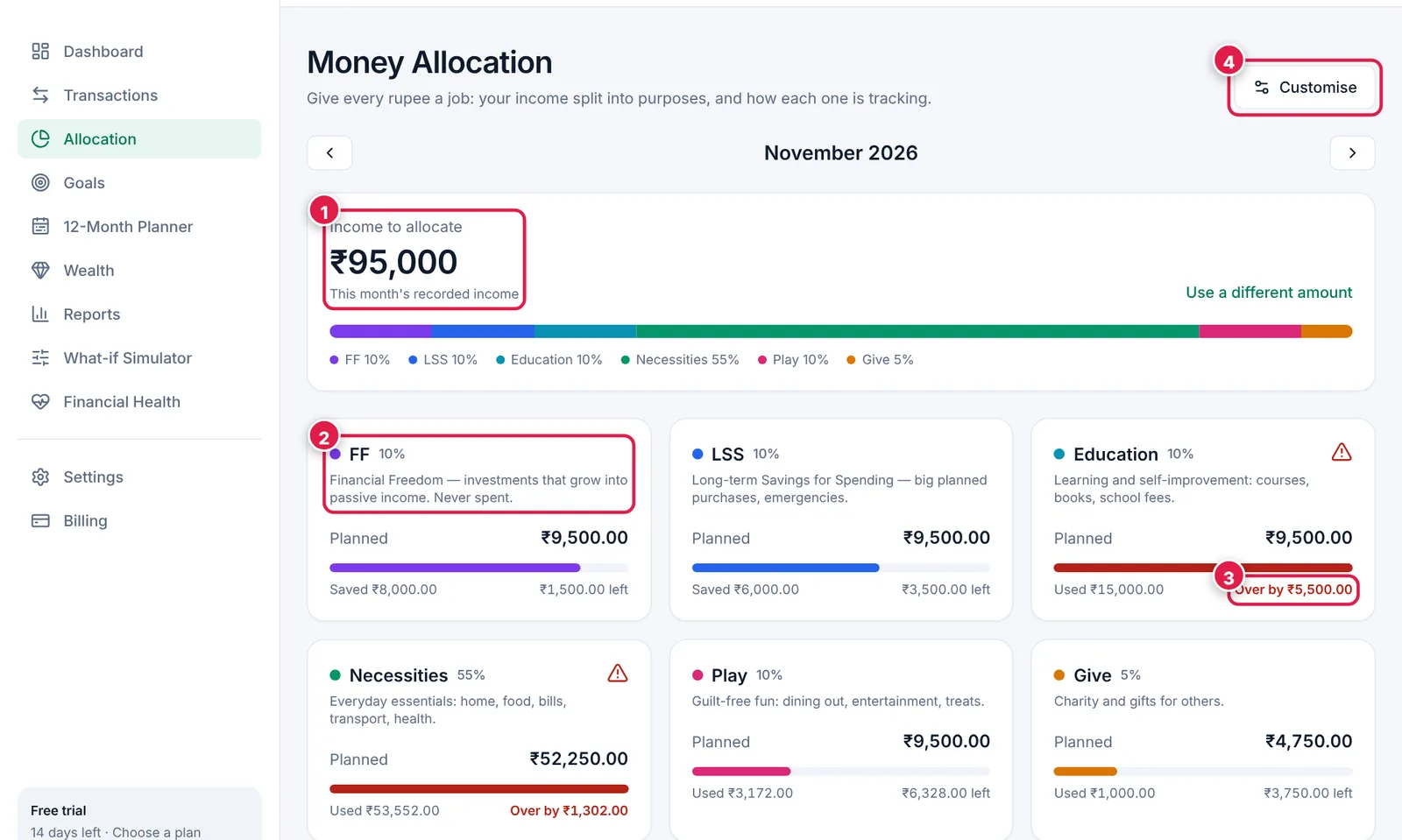
Your income, split into purposes.
- 1. Income to allocate this month.
- 2. A bucket — FF is your Financial Freedom fund.
- 3. Over budget warning — time to slow down in that bucket.
- 4. Customise percentages and links.
On a ₹95,000 salary
FF ₹9,500 → SIP · LSS ₹9,500 → emergency fund · Education ₹9,500 · Necessities ₹52,250 · Play ₹9,500 · Give ₹4,750.
Arun's Education bucket shows “Over by ₹5,500” this month because the school term fees fell due — a planned, one-off spend. Seeing it lets him trim Play for a month without stress.
Ready? It takes about 5 minutes.
Start your free trial