What you get: Categories that match your life make your reports instantly meaningful.
About 3 minutes
Why it matters
Kanakupuli comes with sensible Indian categories (Housing, Utilities, Food, Transport, Education, Family, Giving…). Make them yours — add “Diya's tuition” or “Pet care” — and your reports start speaking your language.
How it works
- 1Go to Transactions → Categories. Switch between Expense and Income at the top.
- 2To add one, type a name and (optionally) choose a parent to make it a subcategory.
- 3Drag the ⋮⋮ handle onto another category to move it under it — as many levels as you like.
- 4Click a name to rename it. Archive what you don't use (history stays). Merge two categories from Edit if you have duplicates.
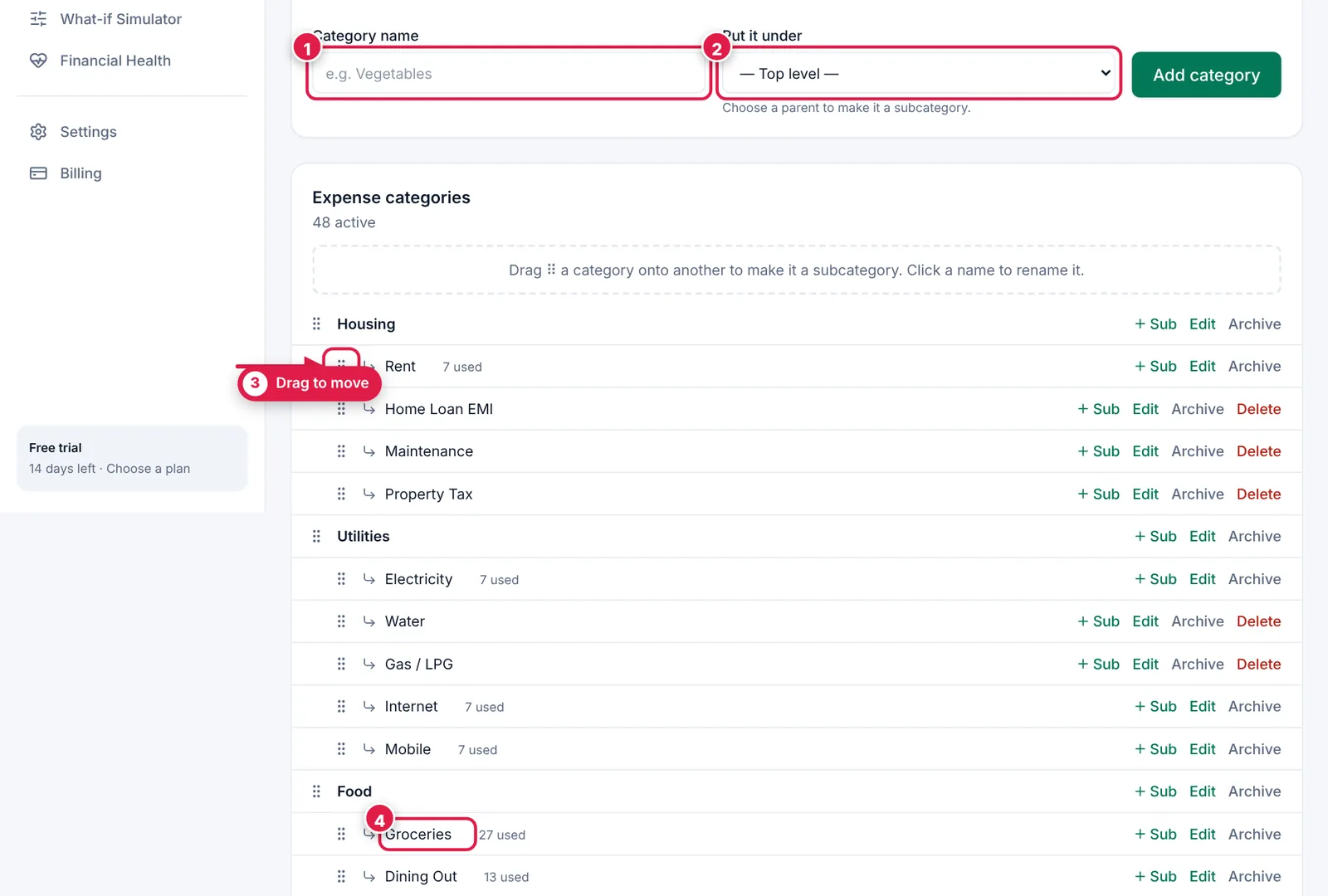
Drag and drop to organise; click to rename.
- 1. New category name.
- 2. Put it under a parent (optional).
- 3. Drag handle — drop onto another category.
- 4. Click a name to rename it.
Ready? It takes about 3 minutes.
Start your free trial